What do the Expert Request stages mean?
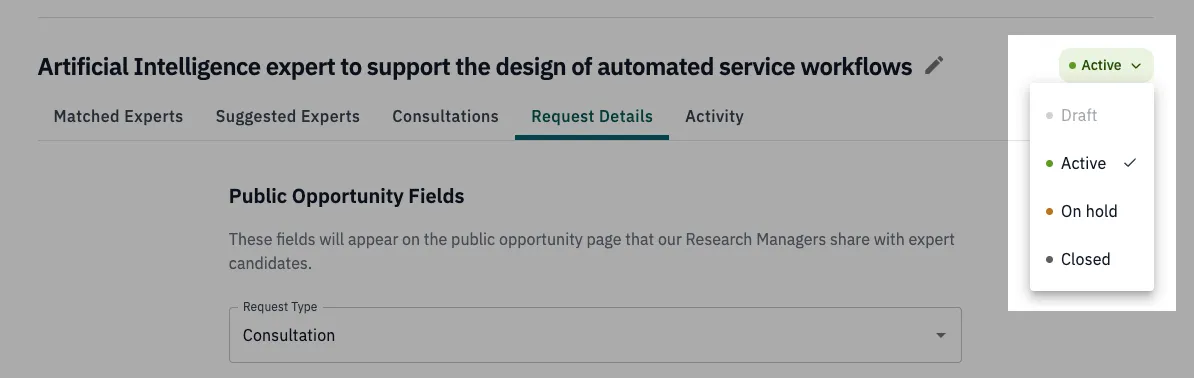
An Expert Request moves through four stages as OnFrontiers sources and delivers experts for it: Draft, Active, On Hold, and Closed. This article goes through how state transitions happen and what does that mean for your project.
Getting started
You submit an Expert Request as soon as you've identified a need for expert insight on a project, whether that need is now or down the road.
You choose how you want that expertise delivered:
- Consultation: a short paid video call with a matched expert, the fastest option
- Written Response: a matched expert answers your questions in writing
- Scoped Engagement: a longer, defined project with an expert over time
Once you've filled out your request, you'll choose when OnFrontiers can start sourcing experts:
Save as Draft or Submit for Sourcing
Save as Draft creates the request but doesn't start sourcing yet. We won't begin looking for experts until you submit it.
This is useful if you're still shaping a pursuit internally, waiting on a teammate's input, or holding a placeholder for a program that hasn't been funded or awarded yet. Save it as a draft, then submit when the need becomes real.
Submit for Sourcing starts sourcing immediately.
You’ll be notified over email as experts are identified and vetted to your request.
The four stages
| Stage | What it means |
|---|---|
| Draft | Not yet submitted. Fully editable. Sourcing hasn't started. |
| Active | We're actively sourcing and matching experts for you. |
| On hold | Sourcing is paused. Nothing is lost, and experts already matched or invited can still respond. |
| Closed | The request is done for now, but not permanently. You can reopen it later. |
What you can edit at each stage
- Draft: everything, freely.
- Active or On Hold: most fields. Existing vetting questions can be hidden, reordered, or added to, but not deleted.
- Closed: you'll need to reopen the request first.
Placing a request on hold
If priorities shift, funding gets delayed, or you just need a pause, place your request on hold instead of closing it. You'll pick a reason and an expected resume date. Sourcing stops, but nothing about your request is lost, and you can resume anytime.
Closing a request
You'll pick a reason when you close, for example the request was filled, no longer needed, or your budget changed. If you have a consultation still pending, you'll need to complete or cancel it before you can close.
Reopening a closed request
Closed isn't final. If a program comes back to life or a new opportunity opens up, reopen the request from where you left off.
Keeping track of changes
Every edit and stage change is logged in the request's activity tab, so you always have a record of what happened and when.